
cat-users AT lists.geant.org
Subject: The mailing list for users of the eduroam Configuration Assistant Tool (CAT)
List archive
Re: [[cat-users]] Question / SSID eduroam w/ and w/o CAT eduroam installer on Windows 11
Chronological Thread
- From: Tomasz Wolniewicz <address@concealed>
- To: address@concealed
- Cc: address@concealed
- Subject: Re: [[cat-users]] Question / SSID eduroam w/ and w/o CAT eduroam installer on Windows 11
- Date: Mon, 26 Jan 2026 17:42:18 +0100
- Authentication-results: mail.geant.org; dkim=pass (2048-bit key; unprotected) header.d=umk.pl address@concealed header.a=rsa-sha256 header.s=default header.b=ZolLcys2; dkim-atps=neutral
- Dkim-filter: OpenDKIM Filter v2.11.0 smtp.umk.pl C6FC92029A
Hi,
This really is a surprise. There is yet one more thing you could try. Run the CAT installer from the command line adding -DEBUG=4. This will create a log file with all steps it performs. It will also show you the path to the WLAN profile it has created and installed. Of course it should be identical to the one you have exported.
After you have done this it is best that you run the installer again this time without DEBUG so it deleted the user profile containing the username and password.
Still I am pretty sure that profile installation with netsh is the only thing that CAT installer does.
Yours
Tomasz
Hi Tomasz and Co.
I did go through your provided steps:
1. First, I compared the exported eduroam profile (XML) deployed with the CAT eduroam installer (XML) vs. the exported profile (XML) manually configured à there are some very small differences, but before I go into details of this step, please see the second action below à I think there is another issue than «differen» configuration statements...
2. Second, I did the following, which is really STRANGE in my opinion:
a) I installed the eduroam WLAN profile via the eduroam CAT installer à WiFi connection is succesful
b) I exported this eduroam WLAN profile with «netsh wlan export profile eduroam» à XML is exported successfully
c) I deleted all WLAN profiles with «netsh wlan delete profile *»
d) I re-imported the exported XML (see bullet point b)) with «netsh wlan add profile filename=xyz.xml» à WLAN profile is imported successfully but the Wi-Fi connection fails this time (!), no 802.1x credentials are sent again (likewise when configured manually)
I really don’t know, what should be the difference between bullet point 1 and bullet point 4...
Have you ever heard of a behaviour like this with eduroam WLAN profiles?
Best regards
Dominic
Von:
Tomasz
Wolniewicz <address@concealed>
Datum: Montag, 26. Januar 2026 um 11:15
An: <address@concealed>,
<address@concealed>
Cc: <address@concealed>
Betreff: Re: [[cat-users]] Question / SSID eduroam
w/ and w/o CAT eduroam installer on Windows 11
Hi Dominic,
I would suggest that you do the following:
from your CMD window run:
netsh wlan show profiles
you should delete eduroam-related ones.
netsh wlan delete profile eduroam
and probably there is also the other Pass-Point related one.
You could also do
netsh wlan delete profile *
if there is nothing else useful there.
Then run CAT installer
Next do:
netsh wlan export profile eduroam
Then delete eduroam and do your own manual setup and export the profile again. This will give the you posiibility to compare both. The only things that CAT is installer does are:
1. install certificates unless already exist on the system
2. install the WLAN profile created on the basis of your settings in CAT
3. create and install user profile contains the credentials - but this step is not relevant - if omitted the system will just ask the user for credentials on first connection.
I hope this will help to debug the problem.
Yours
Tomasz
W dniu 26.01.2026 o 09:51, dominic.stalder (via cat-users Mailing List) pisze:
Hi Wenche
Thanks for your repsonse and you are right concerning WPA3, but based on a lot of recent tests on my side with Wi-Fi 6E and different OS’, Windows does handle this setting as follows:
Set to WPA2-Enterprise: at least WPA2-Enterprise is required on the SSID, but Windows will «upshift» to WPA3-Enterprise, if available on the SSID (important: the CAT eduroam installer puts «WPA2-Enterprise» as the default value when executed as well and it works on Wi-Fi 6E)
Set to WPA3-Enterprise: WPA3-Enterprise is required, Windows does not «downshift» to WPA2-Enteprise, if the SSID only propagates WPA2 à SSID association fails in this case
Hope to help someone with this hint.
Best regards
Dominic
Von: Wenche Backman-Kamila <address@concealed>
Datum: Montag, 26. Januar 2026 um 09:46
An: "address@concealed" <address@concealed>, "Stalder, Dominic (ID)" <address@concealed>
Betreff: Re: Question / SSID eduroam w/ and w/o CAT eduroam installer on Windows 11
Hi,
IIRC, Wi-Fi 6E requires WPA3, in the screenshot you seem to have WPA2.
Regards,
Wenche
----
Wenche Backman-Kamila, Senior Network Specialist - wireless systems and services, CSC/Funet
P.O. Box 405 02101 Espoo, Finland, tel +358 9 457 2737
CSC is the Finnish IT Center for Science, www.csc.fi, e-mail: address@concealed
From: address@concealed <address@concealed> on behalf of dominic.stalder <address@concealed>
Sent: Friday, 23 January 2026 15.18
To: address@concealed <address@concealed>
Subject: [[cat-users]] Question / SSID eduroam w/ and w/o CAT eduroam installer on Windows 11
Dear cat users mailing list
I am in the middle of troubleshooting an eduroam problem on Windows 11. I myself are experienced on the networking side, but only have limited knowledge of Windows (11). Because I simply cannot find the root cause or a solution to the problem, I am taking the liberty of contacting this mailing list...
In short, the problem only occurs in combination with Wi-Fi 6E (6 GHz):
1. if I let the WLAN profile for eduroam be configured by the CAT eduroam installer, everything works perfectly and the client can authenticate against the SSID immediately
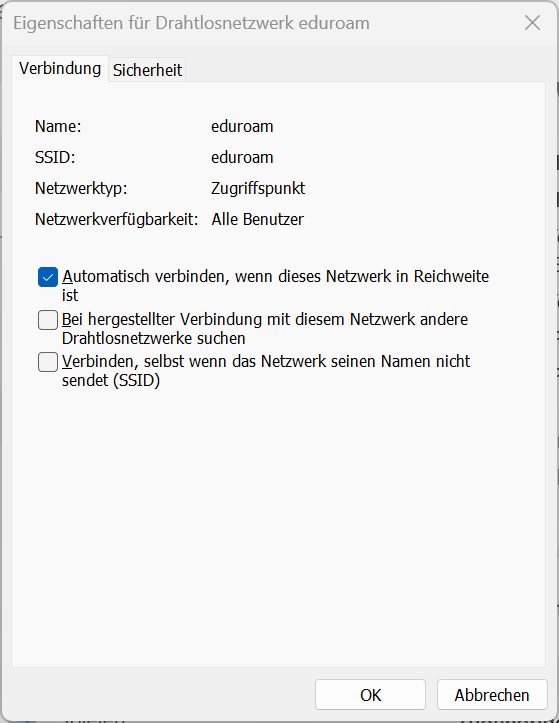
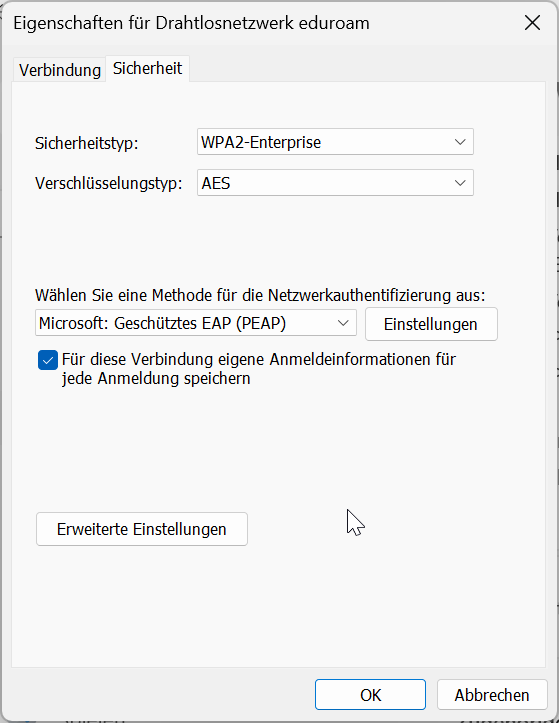
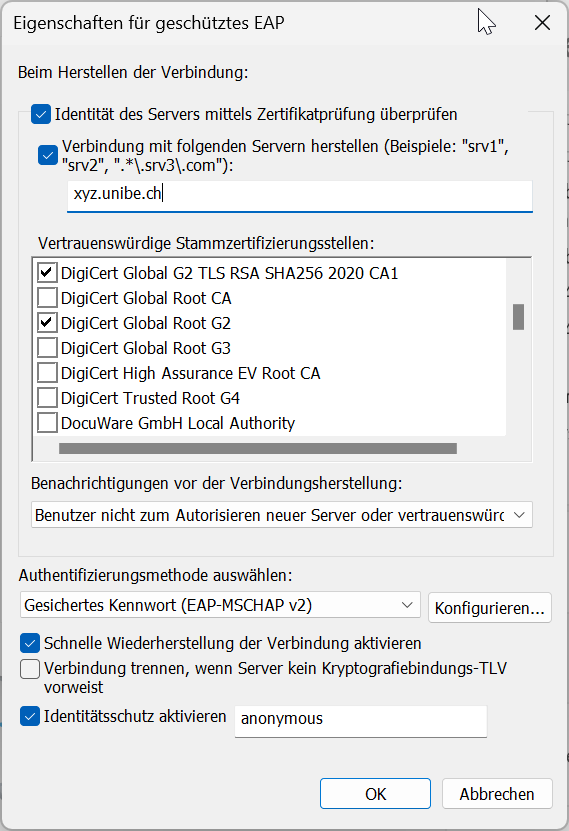
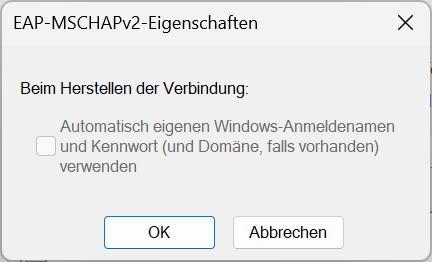
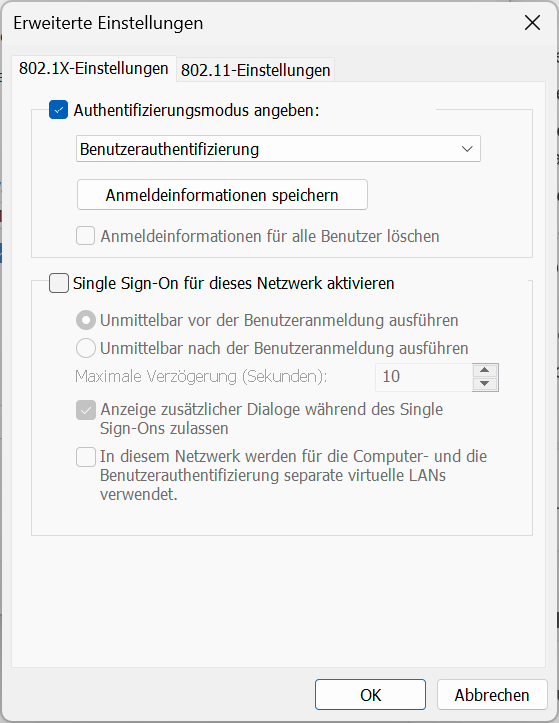
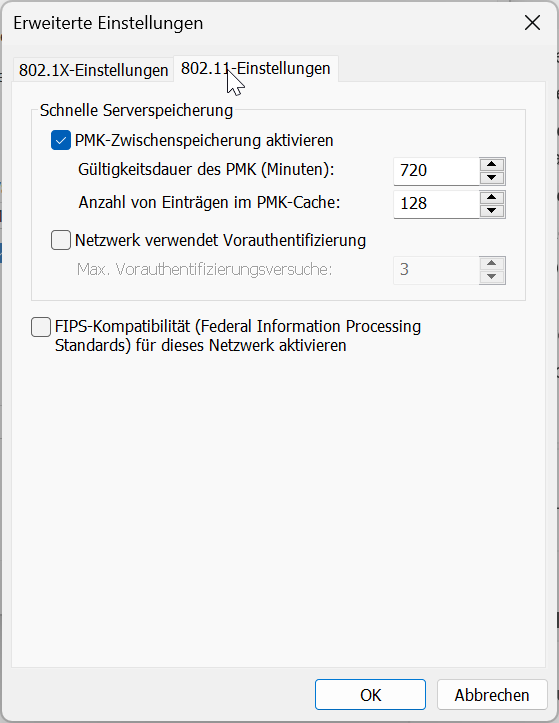
2. if I manually configure the WLAN profile for eduroam with EXACTLY the same settings as with the CAT eduroam installer (1), the client fails to authenticate against the SSID or «runs» into a Dot1X authentication timeout (does not send any credentials) respectively. Those are the settings implemented by the CAT eduroam installer for our eduroam profile and also configured manually (sorry, is in German only):
My question would be: am I missing an important configuration in Windows 11 OR what else does the CAT eduroam installer configure in Windows 11, so it works with our eduroam SSID on Wi-Fi 6E as well? Any idea or recommendation would be appreciated.
Thanks a lot in advance and best regards
Dominic
_________________________________
Universität Bern
Abteilung Informatikdienste
Dominic Stalder
Network Engineer
Hochschulstrasse 6
CH-3012 Bern
Tel. +41 (0)31 684 38 18
address@concealed
www.id.unibe.ch
_________________________________
To unsubscribe, send this message: mailto:address@concealed?subject=unsubscribe%20cat-users
Or use the following link: https://lists.geant.org/sympa/sigrequest/cat-users
The information in this email may be confidential and is intended solely for the use of the individual or entity to whom it is intended. If you are not the intended recipient of this message, please delete the message and notify the sender immediately. For information on how we process personal data and our contact information, please see CSC's website: Privacy
Tämän sähköpostin tiedot voivat olla luottamuksellisia ja ne on tarkoitettu yksinomaan sen henkilön tai yhteisön käyttöön, jolle ne on osoitettu. Jos et ole viestissä tarkoitettu vastaanottaja, tuhoa viesti ja ilmoita asiasta välittömästi viestin lähettäjälle. Tietoja henkilötietojen ja yhteystietojen käsittelystä löydät CSC:n verkkosivuilta: TietosuojaTo unsubscribe, send this message: mailto:address@concealed?subject=unsubscribe%20cat-users
Or use the following link: https://lists.geant.org/sympa/sigrequest/cat-users
--
Tomasz Wolniewicz
-- Tomasz Wolniewicz
Attachment:
smime.p7s
Description: Kryptograficzna sygnatura S/MIME
-
[[cat-users]] Question / SSID eduroam w/ and w/o CAT eduroam installer on Windows 11,
dominic.stalder, 01/23/2026
-
Re: [[cat-users]] Question / SSID eduroam w/ and w/o CAT eduroam installer on Windows 11,
Wenche Backman-Kamila, 01/26/2026
-
Re: [[cat-users]] Question / SSID eduroam w/ and w/o CAT eduroam installer on Windows 11,
dominic.stalder, 01/26/2026
-
Re: [[cat-users]] Question / SSID eduroam w/ and w/o CAT eduroam installer on Windows 11,
Tomasz Wolniewicz, 01/26/2026
-
Re: [[cat-users]] Question / SSID eduroam w/ and w/o CAT eduroam installer on Windows 11,
dominic.stalder, 01/26/2026
- Re: [[cat-users]] Question / SSID eduroam w/ and w/o CAT eduroam installer on Windows 11, Tomasz Wolniewicz, 01/26/2026
-
Re: [[cat-users]] Question / SSID eduroam w/ and w/o CAT eduroam installer on Windows 11,
dominic.stalder, 01/26/2026
-
Re: [[cat-users]] Question / SSID eduroam w/ and w/o CAT eduroam installer on Windows 11,
Tomasz Wolniewicz, 01/26/2026
-
Re: [[cat-users]] Question / SSID eduroam w/ and w/o CAT eduroam installer on Windows 11,
dominic.stalder, 01/26/2026
- <Possible follow-up(s)>
-
Re: [[cat-users]] Question / SSID eduroam w/ and w/o CAT eduroam installer on Windows 11,
Stefan Paetow, 01/23/2026
-
Re: [[cat-users]] Question / SSID eduroam w/ and w/o CAT eduroam installer on Windows 11,
dominic.stalder, 01/24/2026
-
Re: [[cat-users]] Question / SSID eduroam w/ and w/o CAT eduroam installer on Windows 11,
Martin Pauly, 01/26/2026
- Re: [[cat-users]] Question / SSID eduroam w/ and w/o CAT eduroam installer on Windows 11, dominic.stalder, 01/26/2026
-
Re: [[cat-users]] Question / SSID eduroam w/ and w/o CAT eduroam installer on Windows 11,
Martin Pauly, 01/26/2026
-
Re: [[cat-users]] Question / SSID eduroam w/ and w/o CAT eduroam installer on Windows 11,
dominic.stalder, 01/24/2026
-
Re: [[cat-users]] Question / SSID eduroam w/ and w/o CAT eduroam installer on Windows 11,
Wenche Backman-Kamila, 01/26/2026
Archive powered by MHonArc 2.6.19+.