
cat-users AT lists.geant.org
Subject: The mailing list for users of the eduroam Configuration Assistant Tool (CAT)
List archive
Re: [[cat-users]] Question / SSID eduroam w/ and w/o CAT eduroam installer on Windows 11
Chronological Thread
- From: <address@concealed>
- To: <address@concealed>, <address@concealed>
- Subject: Re: [[cat-users]] Question / SSID eduroam w/ and w/o CAT eduroam installer on Windows 11
- Date: Sat, 24 Jan 2026 11:50:59 +0000
- Accept-language: en-US, de-CH, de-DE
- Arc-authentication-results: i=1; mx.microsoft.com 1; spf=pass smtp.mailfrom=unibe.ch; dmarc=pass action=none header.from=unibe.ch; dkim=pass header.d=unibe.ch; arc=none
- Arc-message-signature: i=1; a=rsa-sha256; c=relaxed/relaxed; d=microsoft.com; s=arcselector10001; h=From:Date:Subject:Message-ID:Content-Type:MIME-Version:X-MS-Exchange-AntiSpam-MessageData-ChunkCount:X-MS-Exchange-AntiSpam-MessageData-0:X-MS-Exchange-AntiSpam-MessageData-1; bh=WKD4mN6N/2aBghS9MpbefAiXEfh19TOJwfoeWLsxnr8=; b=kKkXAaaYfZoaqhrGvFGCwgOK732qANAkMAZGlWIhxXwUyVmy+w0TxnDg/WVZJUGBLs01pN77QuzSXUvkrspFkTOtSPgPcC/c5JVuQXLn7JmNLuByUmCNKtEROi7TwOCsd6hNNWDpyKCh6RLkCKeW3Tq5VJwSiusA7W5I97pLurhbdUkBD7xvSD/9k0EGJgSO2N2+2imZ04t8Qt4kiMvoC/SNLYq5q4NrtFdwLXQia9Z38RrVomc+//GzqbEaBYKkYFeLEJZntmZ492XcQxyIS1pW+S5LzqDwdm4ya1UNLFgbvMb86Iw9BgbS4r4EaPtPiMDNUW8TJnIO3w9F2Iyc2A==
- Arc-seal: i=1; a=rsa-sha256; s=arcselector10001; d=microsoft.com; cv=none; b=smokSateqvBOxkIn6BFmrQZwA0tT9PUSOCJF8/nAYGBKYu6J64ZiIeyUNMJOcG2rph4PxmzZ/vofNqQtp0d+sy1zHUU4Mzx3SZLEw4TL1CnwDyVGxYK0hanShCbliRSc8X/O+A97g34M+cyNLHugObCrYr3F/3h+lyiBLr08wbr2V4OAJUL2j+pW5vpw8lq+OARsb4g6QYJ2ghzVeElD610U0ichBPBe10JRVuskON8loe0tqC8bWi46wCr9+WZtIokkGH1Zs216i/c2lx1ZQbxRS2Kc6QeNWoLViPuwolTxVlqP1ukC+l8sKNGDO3dVQD2iz9+8IcuKNYvmftOcTw==
- Authentication-results: mail.geant.org; dkim=pass (2048-bit key; unprotected) header.d=unibe.ch address@concealed header.a=rsa-sha256 header.s=selector1 header.b=Xfdcanjd; dkim-atps=neutral
- Authentication-results: dkim=none (message not signed) header.d=none;dmarc=none action=none header.from=unibe.ch;
- Msip_labels: MSIP_Label_190374fc-c2b5-4c8e-bee8-6305ebc1550a_Enabled=true;MSIP_Label_190374fc-c2b5-4c8e-bee8-6305ebc1550a_Name=External;MSIP_Label_190374fc-c2b5-4c8e-bee8-6305ebc1550a_ActionId=001fa941-8263-4754-979f-d45e4cfb9eba;MSIP_Label_190374fc-c2b5-4c8e-bee8-6305ebc1550a_Tag=50, 0, 1, 1;MSIP_Label_190374fc-c2b5-4c8e-bee8-6305ebc1550a_SetDate=2026-01-23T16:08:26Z;MSIP_Label_190374fc-c2b5-4c8e-bee8-6305ebc1550a_SiteId=48f9394d-8a14-4d27-82a6-f35f12361205;MSIP_Label_190374fc-c2b5-4c8e-bee8-6305ebc1550a_Enabled=true;MSIP_Label_190374fc-c2b5-4c8e-bee8-6305ebc1550a_ContentBits=0;MSIP_Label_190374fc-c2b5-4c8e-bee8-6305ebc1550a_Method=Privileged;
|
Hi Stefan
Thanks a lot for your feedback / help, appreciate it!
> It’s probably your “Identitätsschutz aktivieren” option. It’s set to ‘anonymous‘, not ‘address@concealed’.
At first, this was also something, that I expected to be a root cause, BUT this is indeed the setting, that is deployed by the CAT eduroam installer and this WLAN profile – WHEN deployed with the installer – works and can associate with our eduroam SSID. But to be honest, I was also a little suprised, that the anonymous identity is set to «anonymous» and not «address@concealed». But as written above, it somehow seems to work...
Just for clarification on our setup:
We send all RADIUS requests to our FreeRADIUS servers and we do – indeed - not allow RADIUS requests or identities without any realm. If they have a realm, we either proxy the RADIUS requests to our Microsoft NPS servers (AD) or to the eduroam national upstream servers (Switch).
On the other hand, I don’t think it is related to the anonymous identity or a missing realm at all, because with the manual eduroam profile configuration, those Windows 11 / HP EliteBooks G8 endpoints NEVER send any identiy / dot1x information at all. Debut output of our Cisco Wireless LAN Controller (WLC):
1. Dot11 Association is successful:
2026/01/13 09:45:33.659192635 {wncd_x_R0-7}{1}: [client-orch-sm] [19961]: (note): MAC: 90cc.df1d.a1cd Association received. BSSID 20cc.2749.160f, WLAN eduroam, Slot 1 AP 20cc.2749.1600, H6-O-00-059-29, Site tag 2026/01/13 09:45:33.659344887 {wncd_x_R0-7}{1}: [client-orch-state] [19961]: (note): MAC: 90cc.df1d.a1cd Client state transition: S_CO_INIT -> S_CO_ASSOCIATING 2026/01/13 09:45:33.659886719 {wncd_x_R0-7}{1}: [dot11] [19961]: (note): MAC: 90cc.df1d.a1cd Association success. AID 4, Roaming = False, WGB = False, 11r = True, 11w = True Fast roam = False
2. Dot1X Authentication fails w/o any response from the client at all:
2026/01/13 09:45:33.660076910 {wncd_x_R0-7}{1}: [client-orch-state] [19961]: (note): MAC: 90cc.df1d.a1cd Client state transition: S_CO_ASSOCIATING -> S_CO_L2_AUTH_IN_PROGRESS 2026/01/13 09:45:33.660361989 {wncd_x_R0-7}{1}: [client-auth] [19961]: (note): MAC: 90cc.df1d.a1cd ADD MOBILE sent. Client state flags: 0x71 BSSID: MAC: 20cc.2749.160f capwap IFID: 0x91c01905, Add mobiles sent: 1 2026/01/13 09:45:33.679060420 {wncd_x_R0-7}{1}: [client-auth] [19961]: (note): MAC: 90cc.df1d.a1cd L2 Authentication initiated. method DOT1X, Policy VLAN 0, AAA override = 1 , NAC = 0 2026/01/13 09:45:33.680299004 {wncd_x_R0-7}{1}: [ewlc-infra-evq] [19961]: (note): Authentication Success. Resolved Policy bitmap:11 for client 90cc.df1d.a1cd 2026/01/13 09:45:44.680377057 {wncd_x_R0-7}{1}: [errmsg] [19961]: (note): %DOT1X-5-FAIL: R0/7: wncd: Authentication failed for client (90cc.df1d.a1cd) with reason (No Response from Client) on Interface capwap_91c01905 AuditSessionID 142A5C820013C219B6881EB4
As you can see above, the outer identity is not relevant yet because there is no Dot1x response from the client in first place. It must be something else, I think.
Best regards and have a nice weekend Dominic
Von:
Stefan Paetow <address@concealed>
It’s probably your “Identitätsschutz aktivieren” option. It’s set to ‘anonymous‘, not ‘address@concealed’.
If your RADIUS server blocks realm-less usernames, then yes, it’ll get blocked and authentication stops dead. Also, if you are using NPS as your server, you may want to check that you have a user called ‘anonymous’ (but disable it) in your directory, because NPS does look up the username used in the initial requests in the Active Directory.
Kind regards
Stefan Paetow Federated Roaming Technical Specialist eduroam(UK), Jisc
email/teams: address@concealed gpg: 0x3FCE5142
For eduroam support, please contact the eduroam team via address@concealed and mark it for eduroam’s attention. I am not available on Mondays and Fridays between 12:00 and 15:00 London time (UTC in winter, UTC+0100 in summer).
Note: I don’t expect a reply outside of your working hours, since I work internationally with colleagues in different nationalities with different religions, customs, and holidays. Reply when it is convenient for you.
Jisc is a registered charity (in England and Wales under charity number 1149740; in Scotland under charity number SC053607) and a company limited by guarantee registered in England under company number 05747339, VAT number GB 197 0632 86. Jisc's registered office is: 4 Portwall Lane, Bristol, BS1 6NB. T 0203 697 5800.
Jisc Services Limited is a wholly owned Jisc subsidiary and a company limited by guarantee which is registered in England under company number 02881024, VAT number GB 197 0632 86. The registered office is: 4 Portwall Lane, Bristol, BS1 6NB. T 0203 697 5800.
For more details on how Jisc handles your data see our privacy notice here: https://www.jisc.ac.uk/website/privacy-notice
From:
<address@concealed> on behalf of "dominic.stalder" <address@concealed>
Dear cat users mailing list
I am in the middle of troubleshooting an eduroam problem on Windows 11. I myself are experienced on the networking side, but only have limited knowledge of Windows (11). Because I simply cannot find the root cause or a solution to the problem, I am taking the liberty of contacting this mailing list...
In short, the problem only occurs in combination with Wi-Fi 6E (6 GHz):
1. if I let the WLAN profile for eduroam be configured by the CAT eduroam installer, everything works perfectly and the client can authenticate against the SSID immediately
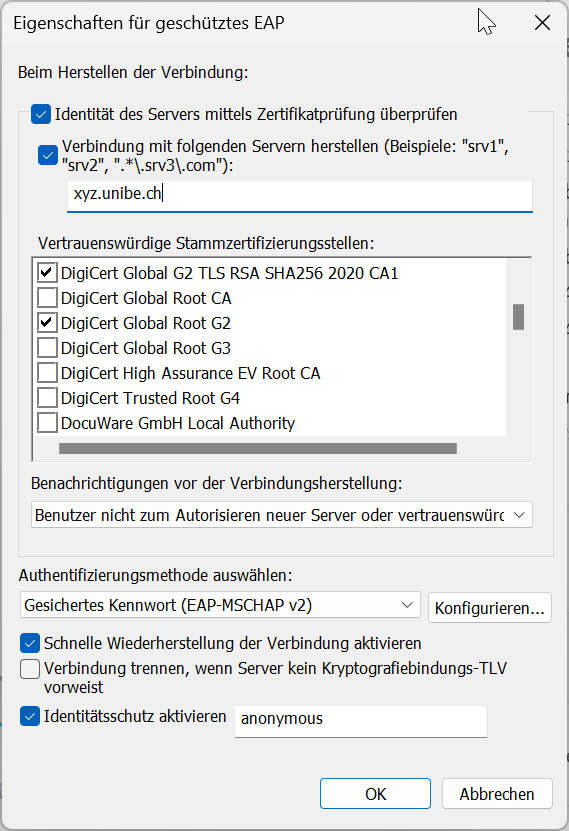
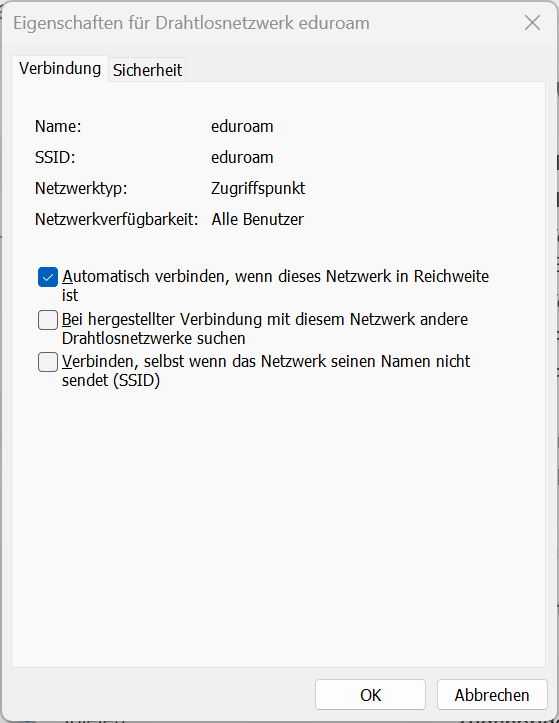
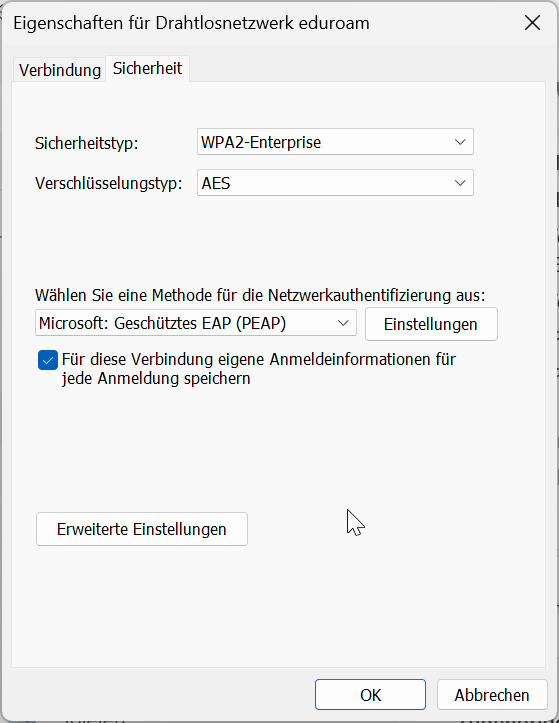
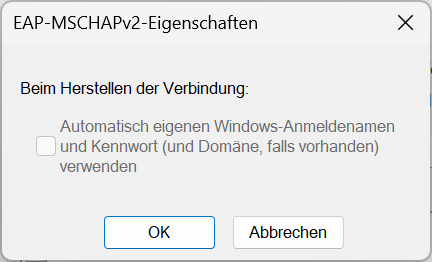
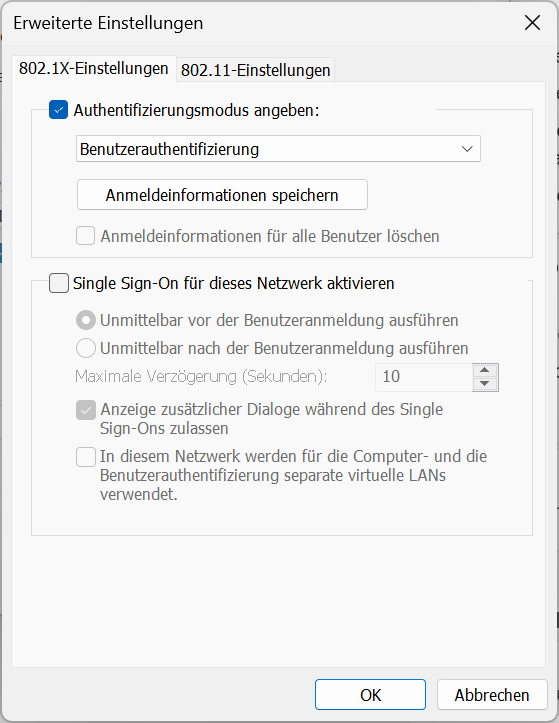
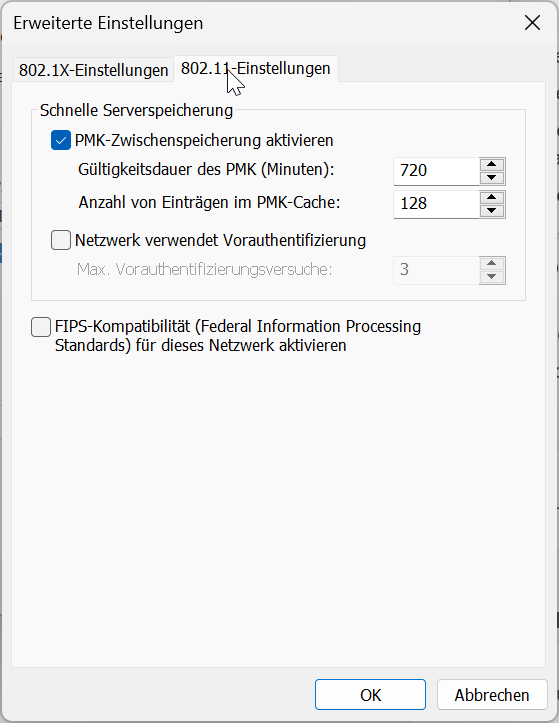
2. if I manually configure the WLAN profile for eduroam with EXACTLY the same settings as with the CAT eduroam installer (1), the client fails to authenticate against the SSID or «runs» into a Dot1X authentication timeout (does not send any credentials) respectively. Those are the settings implemented by the CAT eduroam installer for our eduroam profile and also configured manually (sorry, is in German only):
My question would be: am I missing an important configuration in Windows 11 OR what else does the CAT eduroam installer configure in Windows 11, so it works with our eduroam SSID on Wi-Fi 6E as well? Any idea or recommendation would be appreciated.
Thanks a lot in advance and best regards Dominic
_________________________________ Universität Bern Abteilung Informatikdienste
Dominic Stalder Network Engineer
Hochschulstrasse 6 CH-3012 Bern Tel. +41 (0)31 684 38 18 www.id.unibe.ch _________________________________ To unsubscribe, send this message: mailto:address@concealed?subject=unsubscribe%20cat-users |
-
[[cat-users]] Question / SSID eduroam w/ and w/o CAT eduroam installer on Windows 11,
dominic.stalder, 01/23/2026
-
Re: [[cat-users]] Question / SSID eduroam w/ and w/o CAT eduroam installer on Windows 11,
Wenche Backman-Kamila, 01/26/2026
-
Re: [[cat-users]] Question / SSID eduroam w/ and w/o CAT eduroam installer on Windows 11,
dominic.stalder, 01/26/2026
-
Re: [[cat-users]] Question / SSID eduroam w/ and w/o CAT eduroam installer on Windows 11,
Tomasz Wolniewicz, 01/26/2026
-
Re: [[cat-users]] Question / SSID eduroam w/ and w/o CAT eduroam installer on Windows 11,
dominic.stalder, 01/26/2026
- Re: [[cat-users]] Question / SSID eduroam w/ and w/o CAT eduroam installer on Windows 11, Tomasz Wolniewicz, 01/26/2026
-
Re: [[cat-users]] Question / SSID eduroam w/ and w/o CAT eduroam installer on Windows 11,
dominic.stalder, 01/26/2026
-
Re: [[cat-users]] Question / SSID eduroam w/ and w/o CAT eduroam installer on Windows 11,
Tomasz Wolniewicz, 01/26/2026
-
Re: [[cat-users]] Question / SSID eduroam w/ and w/o CAT eduroam installer on Windows 11,
dominic.stalder, 01/26/2026
- <Possible follow-up(s)>
-
Re: [[cat-users]] Question / SSID eduroam w/ and w/o CAT eduroam installer on Windows 11,
Stefan Paetow, 01/23/2026
-
Re: [[cat-users]] Question / SSID eduroam w/ and w/o CAT eduroam installer on Windows 11,
dominic.stalder, 01/24/2026
-
Re: [[cat-users]] Question / SSID eduroam w/ and w/o CAT eduroam installer on Windows 11,
Martin Pauly, 01/26/2026
- Re: [[cat-users]] Question / SSID eduroam w/ and w/o CAT eduroam installer on Windows 11, dominic.stalder, 01/26/2026
-
Re: [[cat-users]] Question / SSID eduroam w/ and w/o CAT eduroam installer on Windows 11,
Martin Pauly, 01/26/2026
-
Re: [[cat-users]] Question / SSID eduroam w/ and w/o CAT eduroam installer on Windows 11,
dominic.stalder, 01/24/2026
-
Re: [[cat-users]] Question / SSID eduroam w/ and w/o CAT eduroam installer on Windows 11,
Wenche Backman-Kamila, 01/26/2026
Archive powered by MHonArc 2.6.19+.